All work

Case study · Product Design · HR Tech · Enterprise Dashboard

Humans - Making employee separation simpler, smarter, and more transparent

Industry
HR, Enterprise Software
My Role
Product Designer
Platform
Web Application
Market
Mid-size Nigerian teams
Scope
End-to-end workflow · Concept, 2026
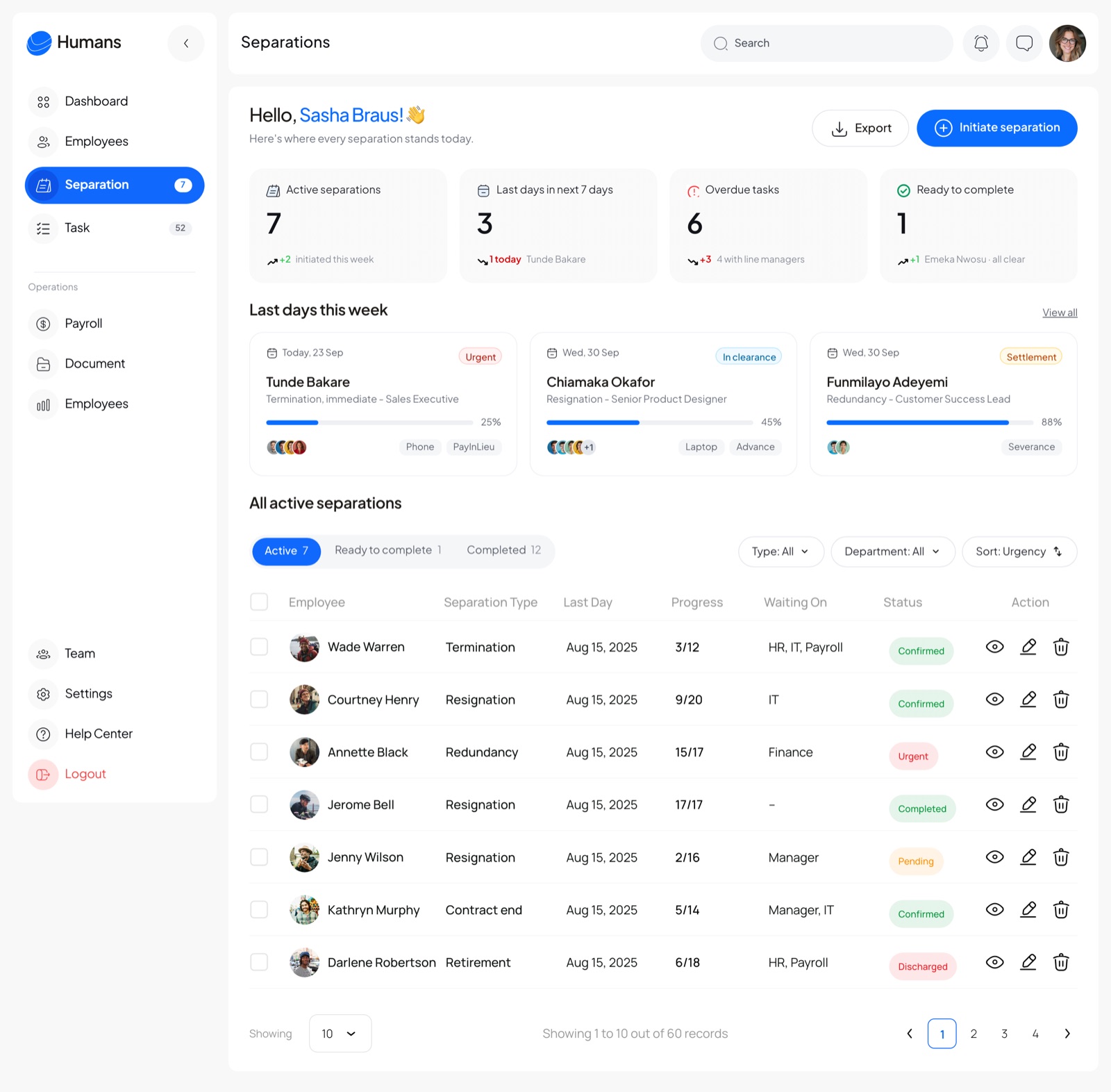
Humans separations overview dashboard

01

Overview

Employee separation involves more than simply marking an employee as exited. It requires coordination across HR, IT, finance, management, and other departments.

Humans Employee Separation Backoffice explores how a structured digital experience can simplify this process: one shared case for every leaver, splitting work into owned tasks and making sure assets, access, and money are settled before anyone closes the record.

02

The Problem

Employee offboarding shouldn’t be this complicated.

Separation is rarely hard work, it’s hard coordination. Desk research mapped the separation journey and isolated the moments that create delay, risk, and uncertainty. The work takes minutes; the waiting for signatures, owners and forms takes weeks.

Problem areas the product addresses:

  • Lack of process visibility - HR can’t see where each separation stands without chasing people.
  • Disconnected departmental workflows - IT, finance, HR and managers each work in separate tools.
  • Manual follow-ups - pending approvals, tasks and documents are tracked by hand.
  • Accountability gaps - without a named owner and a date, tasks slip between teams.
  • Limited reporting - trends and bottlenecks are hard to see.

03

What Desk Research Surfaced

  1. [01]

    The handoffs are the hard part.

    The work takes minutes. The waiting, for signatures, owners, and the form, takes weeks.

  2. [02]

    Obligations surface too late.

    Devices and loan balances appear during clearance, when recovery time has almost gone.

  3. [03]

    Not every task carries equal risk.

    A live account is a blocker. A missed exit interview should never trap the whole case.

  4. [04]

    The case is done when the money is.

    Final pay and deductions are the last, most error-prone step, and depend on every team.

04

Five People, One Case

HR owns the outcome, but the work sits with people across the business who have different priorities and different risk.

  1. Adaeze · HR Ops (primary user)

    One view of status and blockers.

  2. Kelechi · Manager

    A short, dated handover list.

  3. Samuel · IT & Admin

    Early notice and asset context.

  4. Blessing · Payroll

    Confirmed deductions before cut-off.

  5. Chiamaka · Employee

    A clear checklist and documents.

05

Problem Statement

HR needs one shared view that shows who owes what, by when, and what is stopping the case from closing.

06

Product Goals

Building a more structured offboarding experience.

  1. Centralise separation activities

    Every leaver gets one case that holds tasks, documents, settlement and history.

  2. Improve visibility

    Status, blockers and the last-day countdown are visible without opening a case.

  3. Clarify ownership

    Every task points to a team, a named owner and a date.

  4. Simplify approvals

    Overrides follow one rule: an approver, a reason, an audit record.

  5. Monitor outstanding work

    Overdue tasks and the teams holding them surface first.

  6. Structured exit records

    A closed case becomes a read-only record with every document issued.

07

User Journey

The primary user is HR Operations, the case owner, who owns the outcome but not most of the work. Each step below is shown in a designed screen.

  1. [01]

    Separation is initiated

    HR starts a case from the employee record.

  2. [02]

    Details are recorded

    Type, notice, last working day, reason and documents.

  3. [03]

    Teams are assigned

    Obligations on the record become owned, dated tasks.

  4. [04]

    Tasks and approvals are tracked

    Progress, blockers and nudges per team.

  5. [05]

    Outstanding items are reviewed

    Settlement inputs and blockers are resolved before closure.

  6. [06]

    Separation is completed

    Documents are issued and the record becomes read-only.

08

Service Blueprint

Parallel work, one source of truth. Humans pulls obligations at the start, dates every task from the last working day, and surfaces what blocks closure.

InitiateClearanceSettlementClose
EmployeeNoticeHandoverReturn assetsReceive docs
ManagerAgree datePlan handoverConfirm transfer-
HR OpsStart caseTrack blockersReview settlementComplete
IT / AdminScheduleCollect + revokeResolve losses-
PayrollFind balancesSettle obligationsPay final amountConfirm

09

Information Architecture

The navigation mirrors how HR works: separations and tasks are the core, and operations modules support them.

  • Separation - overview, initiate separation, case workspace, separation completed (designed).
  • Task - all open tasks across cases, with a task detail panel (designed).
  • Dashboard, Employees, Payroll, Document, Team and Settings - in the navigation; screens proposed for later.

Wireframes

Every screen started as a greyscale wireframe to settle hierarchy and layout before visual design.

UI Design

The five core screens of the separation workflow, from the overview to a completed case.

Overview Dashboard

Urgency before alphabet. The overview tells HR where to chase without opening a case.

  1. 01Four counts answer “where do I act today?” - active, last days this week, overdue, ready to complete.
  2. 02Cases sort by urgency and proximity to the last day, with progress and open obligations.
  3. 03A “Waiting on” column shows which teams hold the work, so HR knows who to nudge.

Initiating a Separation

Start with what the record already knows.

  1. 01Assets, salary advance, unused leave and app access surface on day one.
  2. 02The separation type changes the plan, retirement adds pension tasks, redundancy adds severance approval.
  3. 03A preview shows the 20 tasks each team will receive, and which ones block closure.

Case Workspace

The whole exit, held in one place.

  1. 01A five-stage tracker shows where the case is; “Complete” stays locked until blockers clear.
  2. 02Tasks are grouped by team, each with an owner, progress and dated checklist.
  3. 03The settlement preview keeps the financial story visible from day one.

Tasks and Approvals

Every task points to a team and a named owner.

  1. 01Open and overdue counts per team: Line Manager, IT & Admin, Finance & Payroll, HR.
  2. 02The task panel gives explicit resolution paths - extend, recover the cost, or write off with approval.
  3. 03Bulk actions let HR nudge owners, reassign or change due dates at once.

Separation Completed

A safer ending, by design.

  1. 01Tasks, assets, final pay and access are each confirmed with evidence.
  2. 02Waived items keep the reason and the approver.
  3. 03Every document issued is downloadable as one separation pack.

10

Key UX Decisions

Every interaction should make the process easier.

  1. [01]

    Information hierarchy

    Counts that need action sit above everything else; detail lives one click away.

  2. [02]

    Status visibility

    A stage tracker, colour-coded badges and progress bars show where a case is, and why it can’t close yet.

  3. [03]

    Table and data organisation

    Segmented filters, type and department filters, urgency sorting and pagination keep long lists manageable.

  4. [04]

    Workflow clarity

    Tasks are grouped by team with a named owner and a due date counted back from the last working day.

  5. [05]

    Consistency

    One set of cards, badges, pills and side panels is reused across every screen.

11

Edge Cases

Design the exception, not just the happy path. Every override needs an approver, a reason, and an audit record.

  1. Asset not returned - hard blocker

    Extend, deduct, or write off with approval.

  2. Last day changes - flow change

    Move open dates and show the payroll impact.

  3. Immediate termination - fast-track

    Revoke access first; make every task due today.

  4. No exit interview - optional

    Waive with a reason. Never block completion.

12

Design System

One blue for action, status colours used only for status, and pill-shaped controls throughout.

  • Primary#0A6CFF
  • Ink#1D1A17
  • Body#6F7580
  • Surface#F5F6F8
  • Border#ECEEF1
  • Success#009637
  • Danger#ED1C24
  • Warning#FF9100
  • Neutral#F1F2F5
  • Primary tint#EAF2FF
Headings
Plus Jakarta Sans · SemiBold 36 / Medium 20
Body
Plus Jakarta Sans · Regular 16 / 14 / 13
Tables
Manrope · Medium 16
Data
IBM Plex Mono · Regular 13

13

Responsive Considerations

The backoffice is designed desktop-first: HR Ops works from dense tables and side-by-side panels. The people who complete tasks, managers and IT, often act on their phones.

  • Desktop - sidebar, multi-column tables and side panels for HR Ops.
  • Tablet - collapsed sidebar; the detail panel opens as a sheet over the list.
  • Mobile - a personal task queue: due date, status and one primary action per task.

14

Expected Impact

This is a concept, so these are intended outcomes rather than measured results.

  • Better visibility into employee separation activities.
  • More organised administrative workflows.
  • Clearer ownership of offboarding responsibilities.
  • Easier tracking of outstanding tasks.
  • More structured employee separation records.

15

Before Building

  1. [01]

    Interview HR Ops

    Talk to 3–5 HR Ops staff at mid-size Nigerian companies.

  2. [02]

    Test the task rules

    Check whether teams accept hard, soft, and optional task rules.

  3. [03]

    Validate final pay

    Review off-cycle final pay and the settlement statement with Payroll.

  4. [04]

    Test on mobile

    Test manager and IT task views on mobile, where action happens.

16

Reflection

Enterprise tools rarely fail because a screen is ugly. They fail when the system can’t explain itself, when nobody can say what is done, what is blocked, and why it is safe to close.

Humans replaces invisible handoffs with a case that can answer those questions. Designing it was an exercise in deciding what matters most at each moment, and making the rules, especially the exceptions, visible.